Julian Melzig
🔒 INTERNAL #17
@Jonas Retry job runs twice. Fix is on you.
From the customer's first sentence to the deploy: Flow keeps tickets, board and estimates together — and everyone involved on the same state.
It starts with a sentence from someone who has a problem, and it ends when that problem is solved and invoiced. Flow walks every station — and the AI steps in exactly where it contributes.
✦ what the AI contributes
The way into a ticket is one sentence. Flow asks the rest — at most three follow-up questions, asked at once, with answers to click. “I don't know” is always a valid answer: a marked gap in the ticket, not a roadblock.
At the end there is a finished draft — title, classification, structured description. It is filed when a human presses the button.
Flow checks the draft as you type — against existing tickets and the knowledge base. If something looks like the same issue, Flow says so before the duplicate exists: “Probably already reported: #1287” — creating it then takes an explicit “Create anyway”. And sometimes the answer is a docs article — no ticket needed.
Pick type, area & environment — title & description follow best practice.
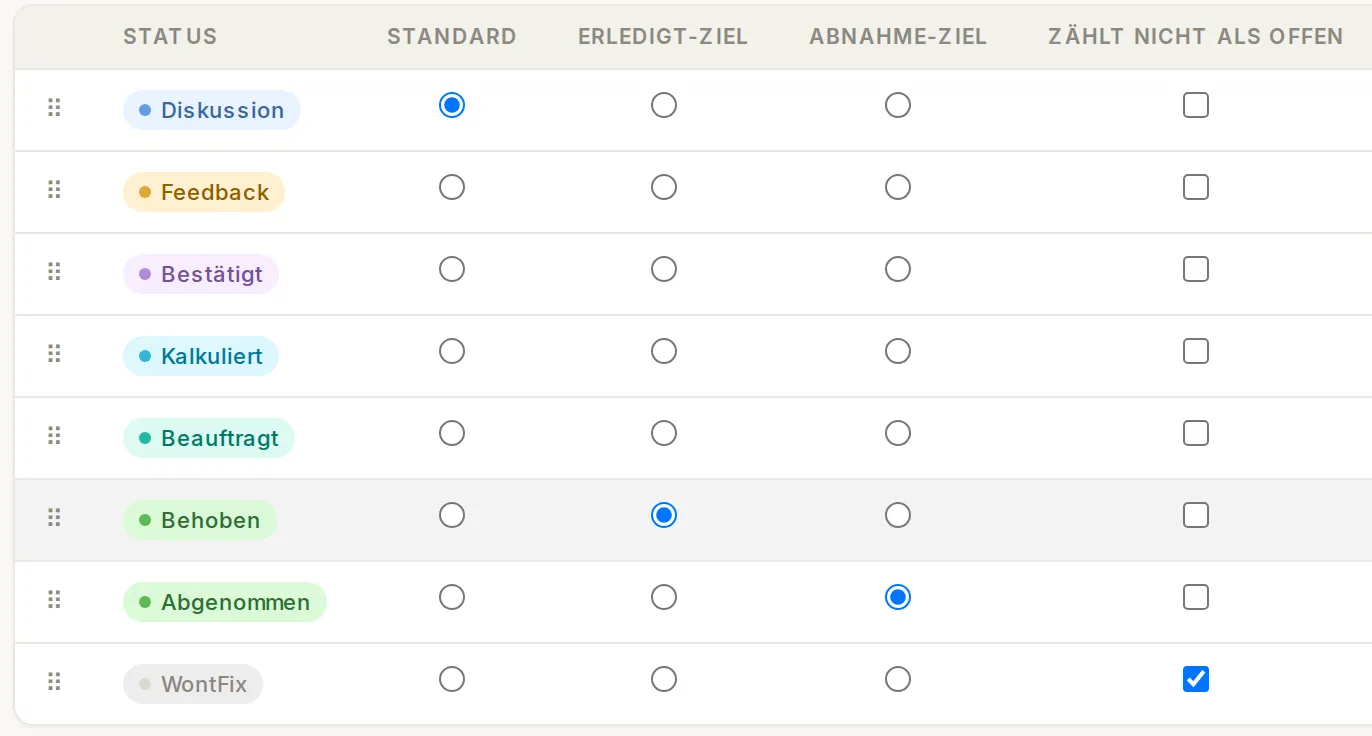
Statuses, categories, areas and environments map your workflow instead of replacing it — down to which status counts as done. None of it is nailed down in code.
Rules run on their own: done tickets archive themselves after 14 days, untouched ones move to the backlog after 30, a merged pull request pushes progress along.
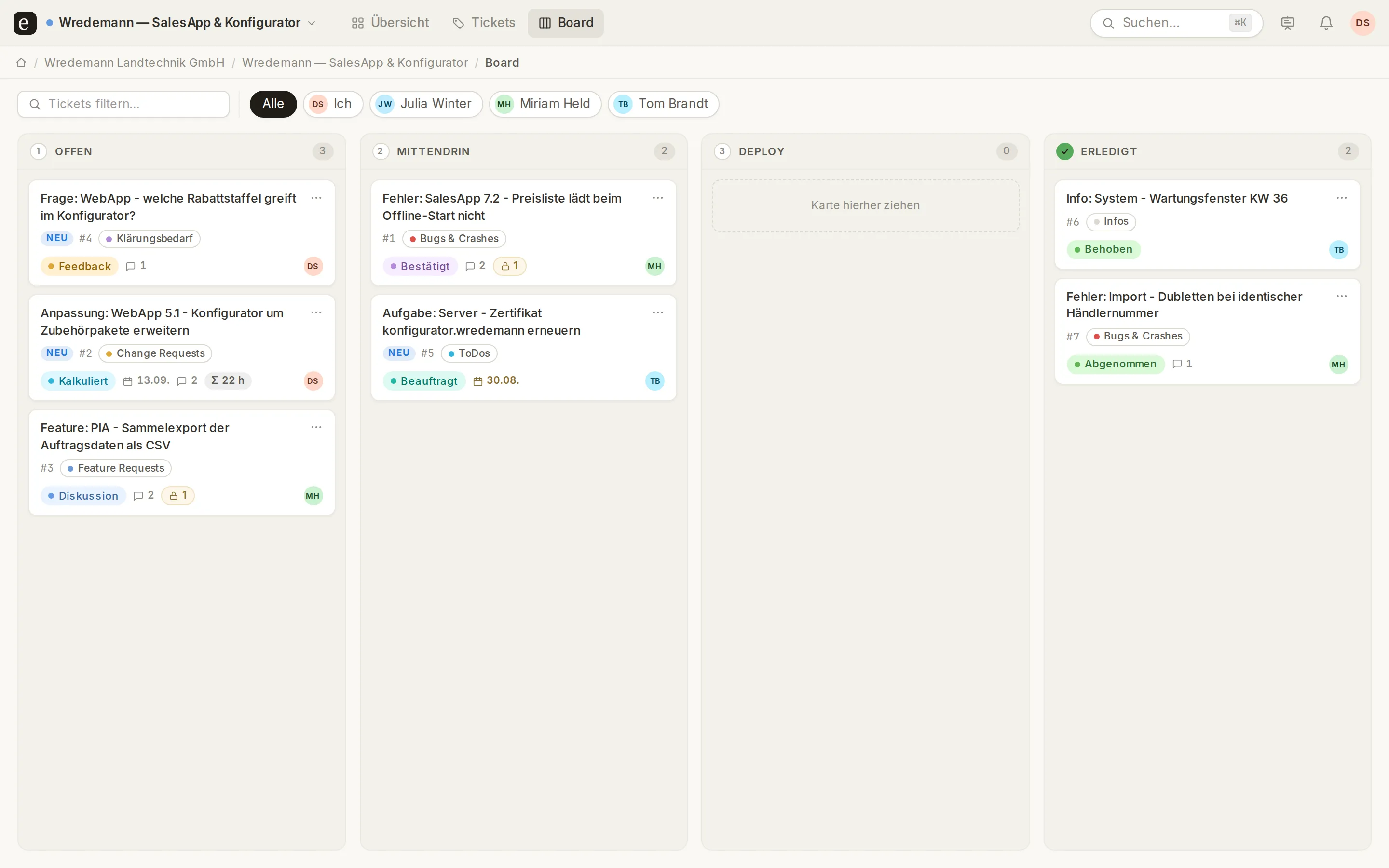
Four columns that match progress: Open → In progress → Deploy → Done. The order of the cards holds for everyone — no “it's at the top for me though”. One board across all projects, with an AI summary right on the card.
And everything is live: a comment appears for everyone while it's being typed. Nobody asks “have you refreshed?” anymore.
The customer reports, comments and signs off — in the same ticket your team works in. Internal notes aren't hidden from them, they're not there: the separation sits in the server, not the frontend.
On click, Flow delivers three reply drafts with a clear intent — follow-up question, status update, solution. Whether your customer prefers formal or casual address, Flow reads from their own messages. Nothing is ever sent automatically.
@Jonas Retry job runs twice. Fix is on you.
We found the bug, the fix ships today.
It comes from the supplier portal.
Internal comment #17 — not visible to the customer
We found the bug, the fix ships today.
It comes from the supplier portal.
Copy the branch name from the ticket and get going: the pull request opens — the ticket jumps to “In progress”. Merged — “Deploy”. Deliberately not “Done”: merged is not live. Your team keeps the last word.
Subtasks can be real tickets, split across several heads — each with its own progress and its own pull request. While a child is open, “Done” stays locked.
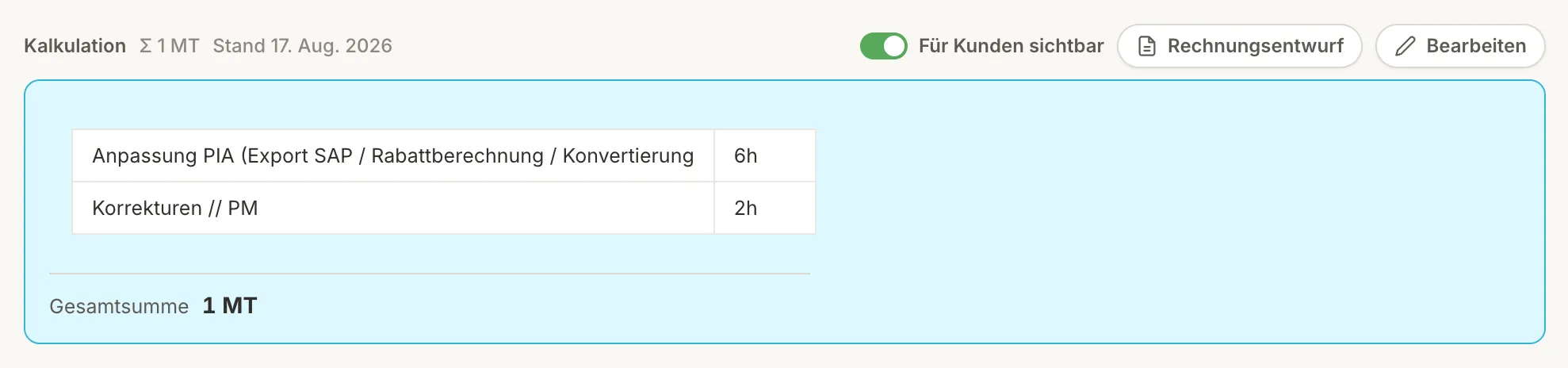
The estimate sits on the ticket, not in a spreadsheet next to it. One click releases it to the customer — read-only, marked “non-binding”. A second turns it into an invoice draft in FastBill, prefilled down to the tax rate.
The numbers are there when you look: resolution time with trend, created vs. resolved, six figures per project — every tile a filter. Customers see their own numbers, without your efforts.
@etappe in a ticket comment, question or instruction after it. Etappe replies as a comment right below — from the ticket, the ticket history and Etappe Book, with ticket numbers as evidence. Instructions it carries out and confirms in one sentence; only assigning a customer waits for a button.
Etappe acts with the permissions of whoever addresses it — nothing that person couldn’t do themselves. Every action appears under their name, “via Etappe”. Internal note in, internal reply out. Recognisable by the Etappe mark and the model name.
#1802 Bug: supplier portal – retry job runs twice
@Etappe Have we had this before? And is there an article on it?
Yes, twice: #1287 (March, same cause – retry without a lock) and #1544. Both solved with the job lock. Etappe Book has “Retry jobs in the supplier portal”. Still open here: the customer’s version.
@Etappe Move to In progress, add Julian, and remind me on Monday.
Done: progress set to “In progress”, Julian Melzig assigned, reminder on Monday at 9 am – here in the thread.
A whiteboard is a small, ordered ticket list for a meeting — within the team or with the customer. Everyone sees the same board, live: whoever sorts or checks something off, sorts and checks it off for everyone.
The spotlight marks what is being discussed right now. Arrow keys move it, space checks off, return opens the ticket. After the meeting the board cleans up after itself — after a configurable idle period it deletes itself. The tickets stay.
Everyone puts AI behind the ticket — checking only after it has been created. The bottleneck sits before it.
And it sits in the thread: @etappe in a comment — the answer lands in the same thread, not in a window beside it.
One click creates a link that serves the ticket machine-readable — the agent reads and comments back. The permission lives in the link: a customer link serves public data only.
Claude, Copilot, your own agent — Flow is the address where they're allowed to work.
No second portal, no extra licence, no copy-paste status email.
No other ticket system takes this step.
One switch, AI off — for the workspace, per project or for your own account. Without a stored key the AI features never start; the rest of the application is untouched.
A hard daily budget in tokens, usage visible per feature, warnings at 50% and 100%. Own key per tenant, free choice of model.
Internal notes, estimates and private tickets aren't hidden — they're never delivered in the first place.
Hosted in Germany; on the Enterprise plan on a dedicated instance, separate from everyone else. Roles and project access are separate.


The complete user handbook for Etappe Flow is online: with screenshots, no sign-up, no sales call in between. It is written in German for now.
No. You pay for team seats. How many people read along on the customer's side is your business — not your bill.
Nothing. The filtering happens on the server. The search doesn't find them, the counters don't count them.
Yes — including which status counts as done and which doesn't count as open.
Yes — interface and notifications, each in the recipient's language. Even your own statuses and categories are bilingual.
Yes, with one switch. On top there's a hard daily budget.
No. Etappe acts only with the permissions of the person addressing it. Customers can ask but not instruct — and deleting isn’t on offer to anyone.
Yes. Branch name from the ticket; opening and merging PRs move the progress.
The migration from ActiveCollab is built and proven with real data. Even the old passwords keep working.
Sign up, short onboarding, straight to work — free plan, no credit card.